
Launching an AI-generated website cleanly requires preparing your niche inputs, domain DNS records, and legal disclosures before generating your first layout. For our complete editorial breakdown and score, read the main TerraSite AI Review (2026).
| Prerequisite Item | Where It Comes From | Required Tier | Why It Matters |
|---|---|---|---|
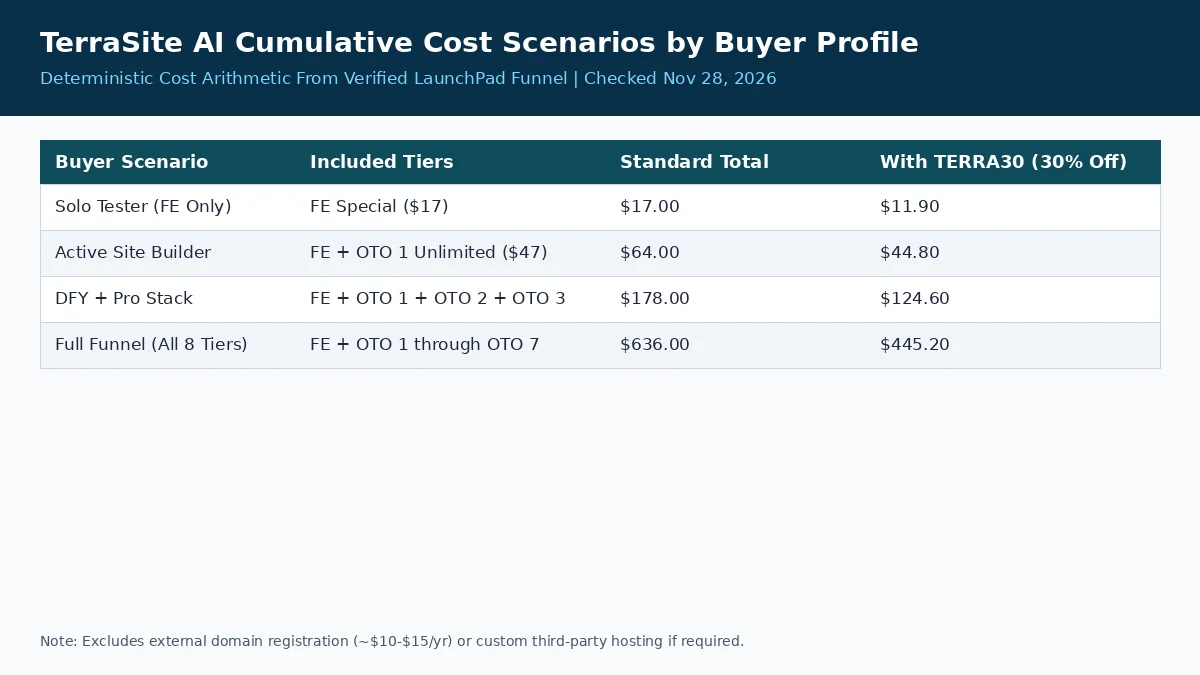
| Active TerraSite AI Login | LaunchPad JV buyer receipt / member portal | Front-End Special ($17 / $11.90 w/ TERRA30) | Authenticates cloud workspace access after checkout. |
| Niche Brief & Offer Positioning | Your product research or client intake notes | Front-End Special | Specific audience and offer inputs produce cleaner AI headlines than single-word prompts. |
| Custom Domain Name | External registrar (e.g., Namecheap, Hostinger) | Verify FE vs. OTO 1 custom domain allowance | Replaces generic subdomains with a brandable URL (~$10–$15/yr). |
| Legal & Disclosure Copy | Your Privacy Policy, Terms, and FTC affiliate notice | Front-End Special | Required for ad network approval and USA consumer transparency. |
Contents
Account access, support links and license boundaries
Immediately after completing checkout on LaunchPad JV, save three items from your order confirmation screen: your transaction receipt ID, your member login URL, and the active customer support desk link. Because the pre-launch JV partner document displayed a legacy support address from an earlier product (comicagentai.com), rely only on the support link inside your actual buyer dashboard.
Before building client sites, verify inside your account settings whether your Front-End license covers commercial client delivery or whether client handoff requires an upgrade.
Documented four-step site creation workflow
Based on the inspected product architecture (Front-End core generator plus optional DFY, Probuilder, and Marketing modules), organize your build in four sequential stages:
- Step 1 — Initialize Your Project Workspace: Log into the web dashboard, confirm your remaining Front-End site quota, and start a new website project (or load a pre-built framework if you activated OTO 2 DFY).
- Step 2 — Input Structured Niche & Audience Details: Provide clear product category, target audience (e.g., USA small business owners or software buyers), and primary call-to-action goals so the AI generates relevant section headings.
- Step 3 — Refine Layout, Copy & Links: Review every generated headline, replace placeholder statistics with verified facts, insert your authorized tracking or contact links, and configure navigation menus (using OTO 3 Probuilder controls if purchased).
- Step 4 — Configure Domain, Meta Tags & Publish: Add SEO page titles and meta descriptions, connect your custom domain CNAME/A-record if supported, and verify HTTPS/SSL padlock activation before sharing the URL.
Scope Note: Exact button labels inside the TerraSite AI dashboard were not inspected prior to the November 29, 2026 release; confirm specific menu locations in the vendor's onboarding tutorials upon login.
Labeled editorial example: niche SaaS comparison microsite
To illustrate how to structure inputs for clean output, consider this editorial planning example for a B2B email marketing comparison microsite:
Sample Input & Verification Plan (Editorial Example)
- Target Job & Audience: Independent newsletter creators in the USA comparing budget email tools under $30/month.
- Required Page Sections: Hero summary with affiliate disclosure, 3-tool feature comparison table, setup checklist, honest limitations note, and 4 buyer FAQs.
- Post-Generation Edits: Manually verify every competitor monthly price against live pricing pages, compress any uploaded images to WebP under 100 KB, and test mobile button wrapping at 375px width.
Post-generation QA and troubleshooting
Run these four quick checks before sending traffic to any published TerraSite AI URL:
- SSL Certificate Pending: If a newly connected custom domain shows a security warning, allow 15–60 minutes for DNS propagation and re-check HTTPS enforcement in domain settings.
- Generic or Exaggerated AI Claims: AI copy generators frequently insert unverified superlatives ("#1 tool," "guaranteed results"). Edit these out to protect brand credibility and ad account compliance.
- Mobile Horizontal Overflow: Open the live page on a mobile browser or Chrome DevTools (375px width) to confirm tables scroll horizontally inside containers rather than breaking page width.
- Form & CTA Destination Check: Click every button and submit a test lead form to verify destination URLs and email notifications work properly.
Decision summary
Treat TerraSite AI's generator as a fast first-draft engine rather than a hands-off publishing autopilot. Following a disciplined four-step workflow—structured niche inputs, manual fact-checking, custom domain SSL setup, and mobile QA—ensures your finished site meets modern reader and compliance standards.
Start Building with TerraSite AIFrequently asked questions
Do I need to install software on Windows or Mac to use TerraSite AI?
No. TerraSite AI is a cloud-based web application accessed through your internet browser, requiring no local desktop installation.
How long does it take to generate a first draft site?
Cloud AI site generators typically produce initial layouts within minutes, though you should budget an additional 30 to 60 minutes for editing copy, verifying facts, and connecting a custom domain.
Can I edit the AI-generated text and links after creation?
Yes, browser-based site builders allow you to edit headlines, body paragraphs, images, and button URLs before publishing. Advanced layout controls may depend on whether you add OTO 3 Probuilder.
Where do I find official tutorial videos for TerraSite AI?
No public demo URL was provided in the pre-launch JV brief. Check the training or tutorial tab inside your member dashboard immediately after logging in.
What should I do if my custom domain does not load right away?
Verify that your registrar's CNAME or A-record matches the exact host values shown in TerraSite AI's domain settings, and allow up to an hour for global DNS propagation.
Related analysis
TerraSite AI Review (2026)
Full 17-section editorial review, weighted scorecard, and complete 8-tier LaunchPad funnel analysis.
TerraSite AI for Affiliate Marketers
Tier selection matrix and cumulative budget math for niche review and bridge-page publishers.
How to Use TerraSite AI
Prerequisites, documented workflow steps, editorial example, and pre-launch QA checklist.
TerraSite AI Alternatives
Like-for-like comparison against Hostinger AI Builder, self-hosted WordPress, and Durable.
Author, method and references
- Official TerraSite AI LaunchPad JV Document (Funnel Pricing, Coupon TERRA30, and Launch Dates — inspected November 28, 2026).
- LaunchPad JV Marketplace Listing Reference (Offer ID 672 — inspected November 28, 2026).
Affiliate Disclosure: Sasi Digital is an independent editorial publisher. If you purchase through links on this page, we may earn a commission at no extra cost to you.
No-Earnings Disclaimer: Software tools do not guarantee affiliate commissions, organic traffic, or revenue. Financial outcomes depend on your niche, content, and traffic execution.